Mouse Shortcut Software for Windows 11 / 10
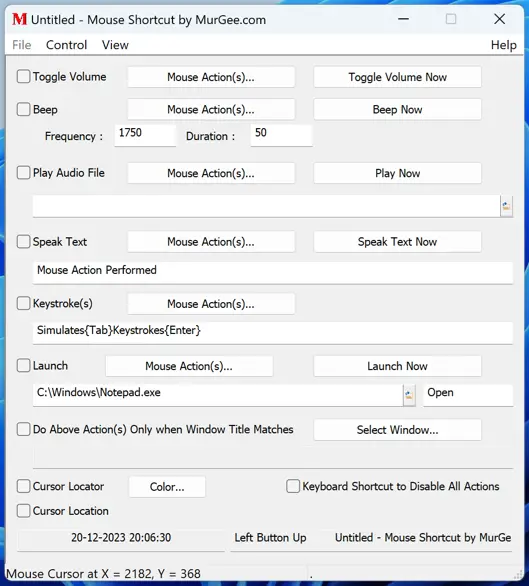
Use your mouse buttons to perform extra tasks with Mouse Shortcut Software for Windows 11 and Windows 10. You can add sound playback to your mouse clicks, execute macro commands with appropriate software, launch applications or open documents, and simulate keystrokes or text typing with this Mouse Shortcut Software for Windows. You can even limit and execute extra configurable actions when the window title under the mouse cursor matches predefined text. Other features allow you to locate your mouse cursor with a configurable circular mouse locator and display the current mouse cursor coordinates on the screen below the mouse cursor location.
A mouse click is a combination of pressing a mouse button down, a slight time delay, and releasing the mouse button. This Mouse Shortcut Software initiates configured action(s) when the mouse button is released. You can even block the default mouse action when you have configured another task to be performed by this software.
Download Mouse Shortcut Software
You can download Mouse Shortcut Software for free and try it on your Windows 10 or Windows 11 computer. Once the free trial expires, you can pay an activation fee of $6.78 and use it on 1 Windows computer for a maximum duration of 3 months from the date of payment.
Add Sound to Mouse Buttons
This Mouse Shortcut Software provides multiple ways to add audio playback whenever selected mouse buttons are pressed. Adding sound to your mouse clicks allows you to get notified whenever configured mouse action(s) are performed.
- Beep: Add an audible beep to any mouse click at a configurable frequency and duration.
- Play Audio: Upon releasing a selected mouse button, an audio file (.wav or .mp3) plays automatically.
- Text to Speech: Have your computer speak configured text upon releasing a selected mouse button.
You can also toggle system volume (mute or unmute) upon releasing selected mouse button(s) using the Toggle Volume task.
Launch an Application or Open Document
Launching an application or opening a document with mouse button(s) allows you to use mouse buttons as shortcuts similar to keyboard shortcut keys. Apart from the application or document path, you can even specify the verb for opening, printing, or executing a macro script. You can use the Execute verb to execute a macro script with a .mamc file path created with Auto Mouse Click by MurGee.com, which allows you to create a macro script and execute combinations of mouse, keyboard, and other Windows actions.
Limit Execution of Configured Tasks on Specific Application Windows
The mouse cursor is used on Windows computers to control various applications. You can limit the execution of configured tasks so they run only when the current window title matches a pre-configured window title. You can select window titles from currently running application windows easily, allowing you to limit task execution to when the configured mouse action is performed on a window with a matching title.
Cursor Locator to Locate Mouse Cursor
You can enable a mouse cursor locator with the color of your choice, displaying a small circle that follows your mouse cursor to locate it easily. You can also enable the display of the cursor location in terms of screen coordinates. Cursor coordinates are also displayed in the status bar at the bottom of the Mouse Shortcut Software.